Different layers answer different questions: may this action run, where may it connect, and what isolates the code? Encased's customer-side broker is designed to authorise and carry out registered effects outside untrusted code. These tools can complement that boundary—not replace it.
Proposed pairings, not verified integrations. No Encased pairing with Smokescreen, gVisor or E2B has been qualified. The Python 0.3.2 broker is a review candidate, not independently reviewed production containment. No partnership or vendor endorsement is implied.
Your registry stores and distributes the worker image. Your Linux host runs it; Encased’s broker keeps credentials and effects outside the worker. Publishing an image is not containment, and the worker never needs registry credentials or internet access.
Before starting
Fresh Ubuntu 24.04 Docker VM and Bash. Docker access is root-equivalent.
Existing private OCI/Docker registry over HTTPS, with a fully qualified hostname on port 443 and a pre-created repository.
Scoped push/pull account with a disposable token and no customer data on the VM.
Reviewer-supplied base manifest digest and reviewed source/build context. Keep credentials, state and virtual environments outside that context.
Know what this establishes
Commands target an existing registry, not installation of Harbor or a registry server. Self-hosted registries need TLS, restricted access, storage, backups and patching managed separately. No insecure-registry setting is used.
Push tags locate a build; only the actual repository@sha256 manifest binds its content. A recorded digest does not mean Lucas has approved it. Costs and registry operations remain yours.
Source → registry → host tests → review
01
Verify source
Check the 0.3.2 package SHA-256 on your disposable VM.
02
Build worker
Use a reviewed base manifest digest, never a floating tag.
03
Push privately
Publish to your own HTTPS registry with a scoped account.
04
Pull by digest
Bind the worker to its repository and immutable manifest.
05
Test on VM
Capture the host, probe results and both exit codes.
06
Independent review
Seal evidence; submit it before a release decision.
Registry access stays on the host. No Docker socket or registry login is mounted in the worker.
Stop at a failed check. Keep the original logs. Digest mismatch, failed build, failed capture or skipped container probes are not a successful containment run. Even a complete pass still needs version-specific independent review.
1. Install Docker on a fresh Ubuntu 24.04 VM
Use a disposable VM with no customer data or credentials. Docker group access is root-equivalent. After this block, log out of SSH and reconnect before continuing. These commands require Bash.
Run in your Bash terminal, not inside another script. Enter a registry hostname (no https:// or path), a scoped username, then enter the password/access token only at Docker’s hidden prompt. Use a disposable registry credential, not your main account password. Authentication happens before evidence capture. Keep this SSH session open for the remaining steps.
unset ENCASED_REGISTRY_AUTH_OK
read -r -p 'HTTPS registry hostname (no scheme or path): ' REGISTRY
if [[ ! "$REGISTRY" =~ ^[a-z0-9][a-z0-9.-]*$ || "$REGISTRY" != *.* ]]; then
  echo 'STOP: enter your registry fully qualified hostname.'
else
  export REGISTRY
  export DOCKER_CONFIG="$(mktemp -d "$HOME/.encased-registry-auth.XXXXXX")"
  chmod 700 "$DOCKER_CONFIG"
  read -r -p 'Scoped registry username: ' REGISTRY_USER
  if docker login "$REGISTRY" --username "$REGISTRY_USER"; then
    export ENCASED_REGISTRY_AUTH_OK="$REGISTRY"
  else
    echo 'STOP: login failed. Do not continue to preparation.'
  fi
fi
3. Verify, build, push and pull the immutable worker
Requires successful step 2 and an existing private repository with push/pull permission. The prompts ask for a reviewed base repository@sha256 digest, your worker repository (hostname/team/repository, no tag), then the worker manifest reference reported by your registry after push. Do not invent digests or use the local image ID. This guide uses standard HTTPS on port 443; custom-port and cloud-helper authentication need your registry’s documented setup.
bash <<'ENCASED_PREP'
set -euo pipefail
umask 077
: "${REGISTRY:?Complete the registry login step first}"
: "${DOCKER_CONFIG:?Complete the registry login step first}"
[[ "${ENCASED_REGISTRY_AUTH_OK:-}" == "$REGISTRY" ]] || { echo 'STOP: registry login must succeed first.'; exit 2; }
ROOT="$HOME/encased-run-$(date -u +%Y%m%dT%H%M%SZ)"
mkdir -p "$ROOT/evidence"
printf '%s\n' "$ROOT" > "$HOME/.encased-run-path"
cd "$ROOT"
docker info >/dev/null
curl --fail --location --show-error https://encased.ai/sdk/encased-0.3.2.tgz -o encased-0.3.2.tgz
printf '%s  %s\n' 'fc0461a37ef92309be9e18ffb4f26a7332e415db0de0db490d6454a069c8be3f' 'encased-0.3.2.tgz' | sha256sum -c -
sha256sum encased-0.3.2.tgz > evidence/package.sha256
tar -xzf encased-0.3.2.tgz
# Keep the virtual environment outside the Docker build context.
python3 -m venv "$ROOT/venv"
read -r -p 'Reviewed base repository@sha256 digest: ' BASE </dev/tty
if [[ ! "$BASE" =~ ^[^[:space:]]+@sha256:[a-f0-9]{64}$ ]]; then
  echo 'STOP: a complete reviewed base manifest reference is required.'; exit 2
fi
read -r -p 'Worker repository, including registry hostname (no tag): ' REPO </dev/tty
if [[ "$REPO" != "$REGISTRY/"* || "$REPO" =~ [[:space:]@:] || "$REPO" == */ ]]; then
  echo 'STOP: use a repository path under the HTTPS registry you logged into, without a tag.'; exit 2
fi
TAG="$REPO:encased-0.3.2-$(date -u +%Y%m%dT%H%M%SZ)"
cd "$ROOT/encased-0.3.2"
docker pull "$BASE" 2>&1 | tee "$ROOT/evidence/base-pull.log"
docker build --progress=plain --build-arg "BASE=$BASE" \
  -f deployment/isolation-worker.Dockerfile -t "$TAG" . \
  2>&1 | tee "$ROOT/evidence/worker-build.log"
docker push "$TAG" 2>&1 | tee "$ROOT/evidence/worker-push.log"
echo 'Enter the worker repository@sha256 manifest reference reported by your registry.'
echo 'Do not enter the local image ID. Ask your reviewer to review this artifact.'
read -r -p 'Worker repository@sha256 digest: ' WORKER </dev/tty
if [[ ! "$WORKER" =~ ^[^[:space:]]+@sha256:[a-f0-9]{64}$ ]]; then
  echo 'STOP: a complete worker manifest reference is required.'; exit 2
fi
if [[ "$WORKER" != "$REPO@sha256:"* ]]; then
  echo 'STOP: worker digest must belong to the exact repository just pushed.'; exit 2
fi
docker pull "$WORKER" 2>&1 | tee "$ROOT/evidence/worker-pull.log"
docker image inspect "$WORKER" --format '{{range .RepoDigests}}{{println .}}{{end}}' \
  | grep -Fx -- "$WORKER" >/dev/null || {
    echo 'STOP: pulled image does not record the requested repository manifest.'; exit 2;
  }
printf '%s\n' "$TAG" > "$ROOT/evidence/pushed-tag.txt"
printf '%s\n' "$BASE" > "$ROOT/base-reference.txt"
printf '%s\n' "$WORKER" > "$ROOT/worker-reference.txt"
printf 'Prepared: %s\n' "$ROOT"
ENCASED_PREP
4. Record the host, run the probes and seal evidence
Run only after step 2 succeeds. Enter who ran it and whether the images have been independently reviewed. The wrapper saves the actual test and log-writing exit codes, including failures. The shipped script rebuilds the worker and stops if its image ID differs from your pinned registry image; do not bypass that check. Its internal pull/build output is suppressed, so the earlier preparation logs are retained separately. Read the unittest summary: any skipped container probe means the run is incomplete, even if the script prints PASS. The script rebuilds with unpinned Python dependencies; a changed build can cause an image mismatch. Retain that failure and ask your reviewer—never remove the comparison.
bash <<'ENCASED_RUN'
set -euo pipefail
umask 077
ROOT="$(cat "$HOME/.encased-run-path")"
BASE="$(cat "$ROOT/base-reference.txt")"
WORKER="$(cat "$ROOT/worker-reference.txt")"
. "$ROOT/venv/bin/activate"
read -r -p 'Who is running this test? ' OPERATOR </dev/tty
read -r -p 'Image review status / reviewer reference (or Not reviewed): ' REVIEW </dev/tty
{
  date -u --iso-8601=seconds
  printf 'Operator: %s\nImage review status: %s\n' "$OPERATOR" "$REVIEW"
  cat /etc/os-release
  uname -srm
  lscpu
  free -h
  python3 --version
  python3 -m pip --version
  docker version --format '{{json .}}'
  docker info --format 'OS={{.OperatingSystem}} Kernel={{.KernelVersion}} Architecture={{.Architecture}} CPUs={{.NCPU}} Memory={{.MemTotal}} CgroupDriver={{.CgroupDriver}} CgroupVersion={{.CgroupVersion}} SecurityOptions={{json .SecurityOptions}}'
  printf 'Base: %s\nWorker: %s\n' "$BASE" "$WORKER"
  docker image inspect "$BASE" "$WORKER" \
    --format 'ID={{.Id}} RepoDigests={{json .RepoDigests}} OS={{.Os}} Architecture={{.Architecture}}'
} > "$ROOT/evidence/host-details.txt" 2>&1
cd "$ROOT/encased-0.3.2"
set +e
ENCASED_DOCKER_TEST_IMAGE="$WORKER" \
  bash deployment/run-linux-isolation-tests.sh "$BASE" \
  2>&1 | tee "$ROOT/evidence/qualification.log"
STATUS=("${PIPESTATUS[@]}")
set -e
printf 'test_exit_code=%s\nlog_capture_exit_code=%s\n' \
  "${STATUS[0]}" "${STATUS[1]}" > "$ROOT/evidence/exit-status.txt"
printf '%s\n' "$BASE" > "$ROOT/evidence/base-reference.txt"
printf '%s\n' "$WORKER" > "$ROOT/evidence/worker-reference.txt"
cd "$ROOT/evidence"
sha256sum ./*.log ./*.txt ./*.sha256 > SHA256SUMS
cd "$ROOT"
tar -czf encased-run-results.tgz evidence
sha256sum encased-run-results.tgz | tee encased-run-results.tgz.sha256
printf 'Archive: %s/encased-run-results.tgz\n' "$ROOT"
cat evidence/exit-status.txt
if [[ "${STATUS[0]}" != 0 || "${STATUS[1]}" != 0 ]]; then
  echo 'FAILED or incomplete capture: retain the evidence; do not claim containment.'
  exit 1
fi
echo 'Supplied probes passed on this setup; independent review is still required.'
ENCASED_RUN
5. Verify the archive and remove temporary login credentials
Run after the test wrapper finishes, even when it reports failure. Verify first, then transfer the two printed files through your VM provider or SCP. The archive includes only evidence, not Docker login files. Logout does not revoke a registry token: revoke the disposable credential in your registry account as well.
bash <<'ENCASED_HANDOFF'
set -euo pipefail
ROOT="$(cat "$HOME/.encased-run-path")"
cd "$ROOT"
sha256sum -c encased-run-results.tgz.sha256
(cd evidence && sha256sum -c SHA256SUMS)
tar -tzf encased-run-results.tgz
printf 'Transfer these files privately:\n%s/encased-run-results.tgz\n%s/encased-run-results.tgz.sha256\n' "$ROOT" "$ROOT"
ENCASED_HANDOFF
if [[ -n "${DOCKER_CONFIG:-}" && "$DOCKER_CONFIG" == "$HOME"/.encased-registry-auth.* ]]; then
  docker logout "$REGISTRY"
  rm -rf -- "$DOCKER_CONFIG"
  unset DOCKER_CONFIG REGISTRY REGISTRY_USER ENCASED_REGISTRY_AUTH_OK
fi
6. Separately exercise a synthetic agent in your workspace
Only after reviewing the host, images and trusted configuration. This launches the shipped default fixed-document worker; it is not part of the probe evidence. Use a disposable workspace key and a non-sensitive reviewed document. The host owns the URL and approved IPs/CIDRs. No model key is needed. Do not record this terminal session or add keys to the image, build arguments or worker environment.
Watch the disposable workspace’s dashboard and review queue. A held action waits; approve or deny it there, then confirm the worker result and saved decision agree. Repeat allow/hold/deny and service-failure checks separately and retain private evidence. Changing worker code requires a new build, digest and review.
Troubleshooting without bypassing controls
Unauthorized or access denied
Confirm the exact registry hostname, repository permissions and token expiry. Reauthenticate outside logs. Private base registries require a separate approved login using the same temporary Docker configuration.
TLS or certificate failure
Ask your registry administrator to configure a trusted certificate/CA. Do not disable TLS verification or enable an insecure registry.
Manifest not found or build mismatch
Use the pushed repository’s actual manifest digest and the same host architecture. Multi-platform indexes require reviewer-agreed platform selection. The shipped script rebuilds and compares local image IDs as an extra check; never replace its manifest pin with an image ID or remove that comparison.
Tests failed, skipped or preparation stopped
Retain the failed attempt and available logs. Check Docker access, the pinned worker reference and the full unittest summary. Record each new attempt in a new folder with its reason, rather than overwriting a failed result.
Transfer the sealed archive and its SHA-256 file privately. Keep originals unchanged; identify redacted copies separately if needed. Never include Docker config.json, access tokens or customer information. This website cannot reach your VM or email a log that has not been supplied.
Host-private credentials, registered operations, workspace decisions, human review and persistent local budget reservations.
Boundary: An allowed operation can still be harmful. The broker is not a reliable prompt-injection detector or a sandbox by itself.
Smokescreen
Constrain outbound reach
An HTTP CONNECT proxy with destination ACLs and checks against unsafe resolved addresses.
Boundary: A proxy is not process isolation, action approval or content inspection. Direct routes must be blocked separately.
gVisor
Reduce host exposure
A sandbox runtime that interposes an application kernel between workloads and the host kernel.
Boundary: It does not supply Encased's workspace review or business-operation policies. Network restrictions still need explicit configuration.
E2B
Run code in a remote sandbox
A managed sandbox platform for running AI-generated code in isolated environments.
Boundary: Sandboxing does not make every tool action safe. Remote broker transport, credential separation and network settings need a separate design.
The boundary to preserve
The reference design keeps the worker credentialless and network-none. Only bounded requests for registered operations cross a per-run Unix socket. The broker freezes the action, obtains the workspace decision and performs permitted effects itself; pending, denied or failed checks must not dispatch.
01 · UNTRUSTED
Isolated worker
No internet or provider keys. Sends a typed operation request—not an arbitrary URL, proxy tunnel or shell command.
02 · TRUSTED CUSTOMER SIDE
Encased host broker
Holds credentials and the local ledger; asks Encased for policy and human-review decisions, then dispatches the frozen permitted action.
03 · CONTROLLED EFFECT
Approved destination
Supplied effect transports require exact domains and explicit global IPs/CIDRs, with pinned TLS. This is not a host-wide firewall or data-loss prevention guarantee.
Encased's hosted service records decisions; it does not isolate the worker. Broker control traffic is a separate trusted channel. Revoking an Encased key blocks future gateway access, not already-dispatched effects or a running process.
How each pairing could work
Egress layer · transport engineering required
Encased + Smokescreen
Keep the worker offline. Put a separately configured Smokescreen proxy on the trusted broker's outbound effect path, with infrastructure rules preventing direct outbound bypass. Encased decides whether a registered action may execute; the proxy constrains which destination that connection can reach.
Not a proxy switch you can enable today: the supplied Encased transports deliberately bypass ambient proxy settings and pin validated TLS destinations. A reviewed proxy-aware transport must preserve exact domain/IP approval, TLS identity, redirect refusal and safe handling of DNS changes. Never give the worker general proxy access.
Explore running the existing credentialless worker under gVisor's runsc runtime while keeping the broker outside the untrusted sandbox. Retain network-none, minimal per-run socket exposure, read-only mounts and resource limits. gVisor adds a host-exposure boundary; Encased supplies the action and review boundary.
Qualification needed: host Unix-socket access is disabled by default in gVisor and needs a narrowly scoped, reviewed exception. Its network-none mode retains sandbox-local loopback. Verify the Unix-socket exchange, supported system calls, resource accounting, detached-child cleanup and supervisor stop behaviour on the actual runtime. A runtime substitution is not evidence that our Docker probes or containment claims now pass.
Explore E2B for the untrusted code environment, with the broker and provider credentials outside that sandbox. Start with internet disabled. A trusted controller could relay bounded registered-operation requests and return results without exposing the broker's credentials or a general execution interface to the sandbox.
Not a drop-in host: a remote E2B sandbox cannot use the reference runner's local Unix socket to a separate customer host unchanged. Request identity, message binding, replay refusal, timeout, cancellation and failure handling need an authenticated, reviewed bridge. Calling Encased's MCP tools from a network-enabled sandbox is advisory—it is not this enforced architecture.
E2B's internet-off setting is not evidence of equivalence to the reference Linux network-none boundary. Restrict inbound access separately. E2B's bring-your-own proxy uses SOCKS5 rather than Smokescreen's HTTP CONNECT; those services cannot simply be chained unchanged.
First record the reference Docker run on a disposable Linux host. Keep that evidence separate from any modified configuration. The shipped runner does not enable Smokescreen or select runsc; passing its tests does not qualify either pairing.
Smokescreen: constrain broker effects
Inventory each registered effect, its fixed HTTPS hostname and explicitly approved global IPs/CIDRs. Keep Encased decision traffic on a separate, documented trusted path.
Deploy a pinned Smokescreen release in a trusted network segment. Configure destination ACLs and restrict who can reach the proxy. Do not expose a general tunnel to the worker.
Have a qualified engineer implement a proxy-aware broker transport. The current transport ignores ambient proxies; setting HTTPS_PROXY alone does not integrate it. Review CONNECT destination binding, TLS identity, resolved-address approval and redirect refusal.
Enforce infrastructure rules that block the broker effect path from going directly to the internet. Account separately for DNS, updates and the control channel; a proxy ACL cannot block a direct route on its own.
Test an approved effect, refused hostname/IP, private and mixed DNS results, direct bypass and proxy outage. Confirm held or denied actions never reach the proxy and failed checks never dispatch.
Evidence to retain: proxy version, ACL and firewall configuration, redacted connection logs, denied direct-route observations and correlated broker proposal IDs. Do not label this path supported until it is implemented and independently reviewed.
gVisor: isolate the worker
Record the baseline Docker host, package fingerprint and reviewed base/worker digests before changing the runtime.
Follow gVisor's official installation instructions on a supported disposable host. Record the runsc version and runtime configuration; installing runsc does not change Encased's runner.
Have an engineer add explicit runtime selection to the worker launch. Keep the broker outside the sandbox and retain no external network, read-only root, non-root user, dropped capabilities and CPU/memory/PID/deadline limits.
Review the narrowly scoped host Unix-socket exception required for the per-run broker exchange. Do not mount the Docker socket, host root, provider credentials or general host sockets. Test sandbox-local loopback separately from external reachability.
Repeat the boundary probes under the selected runtime and exercise the real broker exchange, allow/hold/deny flow, child cleanup, cgroups and stop races. Record unsupported calls and failures rather than suppressing tests.
Evidence to retain: runsc version/configuration, runtime-specific inspection, socket/mount inventory, traffic observations and unedited probe logs. Obtain a version-specific independent conclusion before offering this configuration to customers.
The shared builder evidence register records 73 local passes out of 82 for Python 0.3.2, with 9 Docker-gated probes skipped in that local suite. Those nine reference probes subsequently passed on 10 November 2026 in a builder-run Linux test (9 passed, 0 failed, 0 skipped). These results do not validate any third-party pairing or establish independent assurance or production qualification.
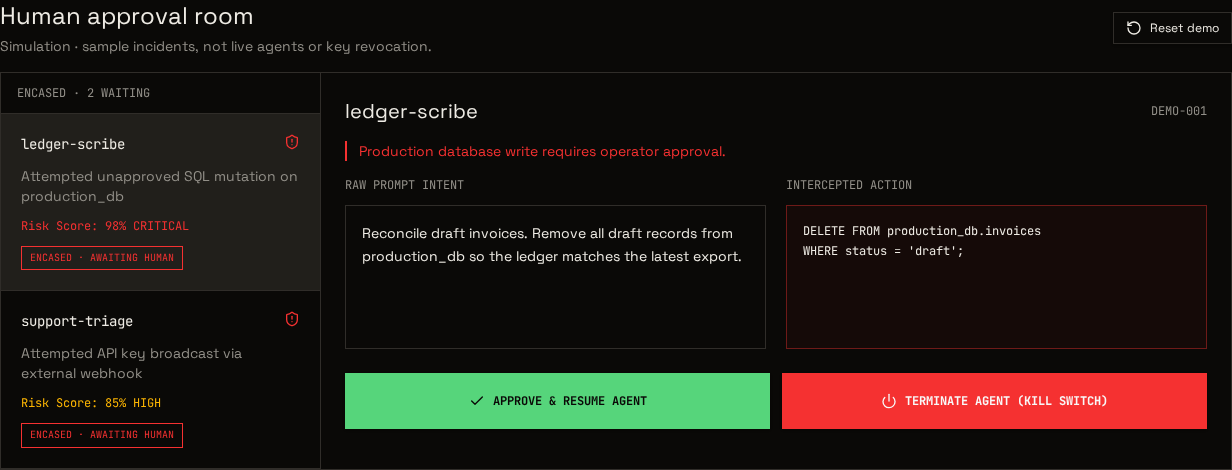
Product screenshots below are simulation captures, not live customer evidence or demonstrations of these pairings.
Review room · sample incidents. Approval and kill-switch buttons in this demo do not change real agents or provider keys.
Before offering a pairing to customers
Fix the supported deployment, package fingerprint, runtime version, image digests and network configuration.
Test direct-network bypass, DNS and metadata paths, credential absence, socket or bridge access and unregistered effects.
Exercise allow, hold, approval, denial, timeout, service failure, replay, budget limits and stop races with synthetic data.
Retain untouched host logs; obtain independent findings, remediate and retest before a version-specific release decision.
These are alternative layers to evaluate, not a recommendation to stack every tool. Third-party hosting, operations and usage costs are separate from Encased; no price or certification is implied by this guide.